
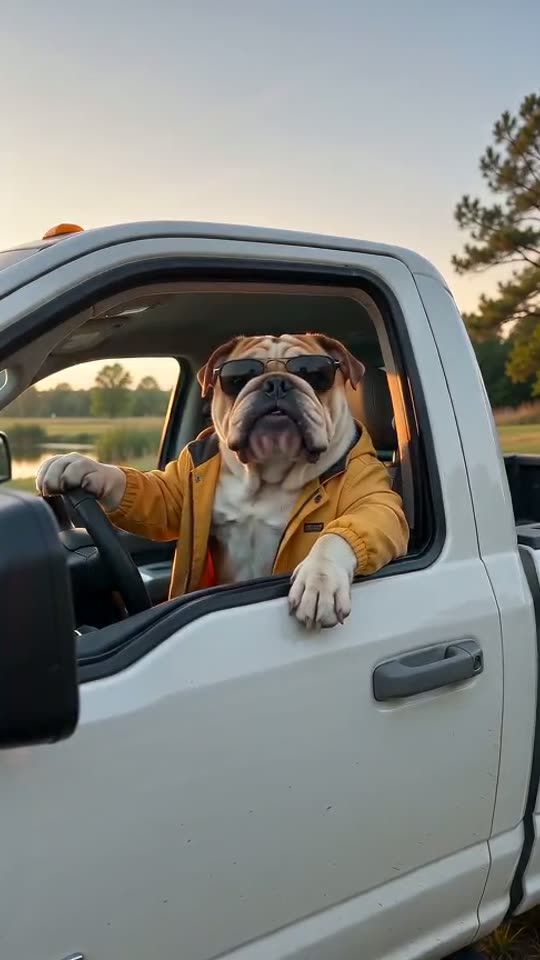
What is the State Property Meme AI trend?

The State Property meme starts at an open pickup window. A visitor calls the land public. The driver looks puzzled, pauses, then points down the road. That dry “Hit the road, dude” reply is the heart of the joke. Here, your photo supplies the new driver.

Use State Property Meme AI to cast yourself or a pet in that scene. A built-in clip guides the speech, pauses and gestures. Your photo guides the face or fur. Keep the pickup setting for a close match to the reference, then check the new video before you share it.

Photo input
One person, dog or cat
Video model
ByteDance Seedance 2.0 Mini
Person version
11-second output with speech
Pet version
15-second output with speech
Create your version
Source template example: a ginger cat at the truck window. New renders may change speech, timing and looks.

Hit the Road Dude AI examples

Browse these State Property meme video references to pick a style. They show the source template’s range, not a promise of the same result. Use your own photo of a person, dog or cat.

Bearded driverTry
Bulldog in shadesTry
Auburn-haired driverTry
Cat in a capTry
Young adult driverTry
Golden retrieverTry
French bulldogTry
Camo bulldogTry
Ginger cat driverTry
Pickup by the pondTry
Banana-hat catTry
Siamese in a bow tieTry
Plaid-shirt dogTry

State Property Meme AI prompt ideas

Start with one small reaction. These notes refine the built-in performance rather than replace it. Pick a prompt to load it into the tool, upload your photo, then check the credits. Choosing a note does not start a paid task.

The puzzled stare

Let the face carry the joke. Hold a beat before the reply.

Keep the reference subject and pickup scene. Look toward an off-camera visitor and hold a puzzled pause. Keep one steady daylight shot with the face clear. No text or logos.

Pause, then point

Give the hand or paw room to show the way out.

Hold a brief puzzled stare, then lift one hand or paw to point away. Keep the face and gesture in frame, preserve the pickup scene and use one steady shot. No cuts or captions.

A dry reaction

A raised eyebrow and a small gesture keep it understated.

Keep the reference subject in the pickup setting. Raise one eyebrow, hold a dry pause, then make one small gesture away. Keep the face and hand or paw clear in a steady medium shot.

Write a State Property Meme AI prompt

The reference already guides the speech and its order. Use the prompt for a short visual note: who is in the scene, what small action to refine, and how to frame the shot. Do not pack several scenes into one clip.

One clear subject

Use a well-lit photo with a clear face. Pick Person for a portrait or Pet for a dog or cat. Avoid a group shot, heavy face filters or a crop that hides the eyes. Upload a photo you have the right to use.

One small action

Ask for a puzzled stare, a short pause or one point toward the road. Keep the main dialogue in place. Extra actions can crowd out the reply or move a hand across the face. Watch the new render to check the timing.

Room for the gesture

A steady medium shot makes the face and pointing hand easy to read. Keep the visitor off camera. Leave space around the window and at the edge of the frame. In a tall crop, check that the hand or paw stays in view.

Make a State Property meme video

  1. Pick a person or pet

    Start with a clear face or pet photo. The State Property Meme AI template adds the reference clip for you. Keep the subject in view and avoid group shots.

  2. Check the scene and credits

    Keep the preset prompt or add a short visual note. Choose your format and quality. The credit quote includes both the reference clip and the new video. This is a paid template.

  3. Generate, then watch

    Click Generate and sign in when asked. Pay if needed, then follow the task status. Play and download your result once it is ready. Review the speech and face before you share it.

Make the State Property meme your own

Hit the Road Dude AI works as a short reaction scene. Choose a subject and a format that suit the post you want to make. The built-in pickup reference stays the same; your photo and visual note shape the new take.

Put yourself in the driver’s seat

Use a clear adult portrait for a personal reply or a joke with friends. Keep the face visible and the visitor off screen. Watch for face changes during the turn and point.

Give your pet the last word

Try a dog or cat as the pickup driver. Fur color, markings and ears help guide the new look. A simple outfit can add to the joke, but check the paws and mouth in the result.

Frame a short social post

Choose 9:16 for a tall reaction clip, 16:9 for a wide scene, or 1:1 for a square post. Preview the crop and leave room for the final gesture. Save the video once it is ready.

State Property meme video costs and checks

This is a paid video template. The quote includes the reference clip and the new output. Pick your version and quality before you start. The Generate button shows the current total; switching a setting does not buy or submit a render.

Version480P720P
Person · 11s42 credits78 credits
Pet · 15s44 credits81 credits

The person version uses a 15-second reference. The pet reference is just over 11 seconds and is billed as 12. Both input and output time count toward credits. These totals use the same rate as the generation service.

Play the clip with sound. Check the speaking turns, face or fur, hand or paw, and final point. A confirmed failed task returns its consumed credits. That credit return is not a cash refund. If a task is still pending, check its status before starting another.

State Property Meme AI questions

What is the Hit the Road Dude AI template?

It puts your chosen person or pet in the pickup driver role. The reference clip guides the “Hit the road, dude” reply, pauses and pointing gesture. Upload a photo you have the right to use.

Can I make a State Property meme video with my pet?

Yes. Pick Pet and upload one clear dog or cat photo. The pet prompt keeps fur, markings and ears as visual cues. Faces, paws and speech may vary, so check the result.

Is the State Property Meme AI template free?

This template uses paid Seedance 2.0 Mini with a reference video. It does not use the free Grok trial. Check the credits shown on the Generate button before you start. A longer reference also adds to the cost.

Will Hit the Road Dude AI copy every line and gesture?

The template asks the model to follow the reference, but each video is a new render. Speech, timing and face details can change. A clear single-subject photo gives the model a better guide.

Do I need to write a full prompt?

No. The template already sets the pickup scene, dialogue and gestures. Keep the default note or choose one of the short prompt ideas. Add only the visual details you need. A note loads into the tool; you still choose when to generate.

Does the Hit the Road Dude AI video include sound?

The model is asked to make speech with the video. Turn on sound when you review it and check who speaks at each point. The voice, exact words and lip timing can vary. The reference is a guide, not a promise to copy the original voice.

What happens if my generation fails?

A task confirmed as failed returns the credits it used. If the task is still processing or its submission is being checked, wait for the status to settle. Starting again can create another paid task. Cash refund rules are listed in the terms.

Which video formats can I choose?

This template offers 480P and 720P with 16:9, 9:16 or 1:1 framing. The person version makes an 11-second clip; the pet version makes a 15-second clip. Choose the format in the tool and check the credit quote before you generate.

State Property Meme AI guides

Need a quick check before you start? Jump to the photo steps, prompt tips, meme scene or credit guide. Each section helps you make and review one clear clip.

Make your first State Property meme video

Bring one clear photo and let the reference guide the scene. Choose Person or Pet, check the credits and create your own Hit the Road Dude AI reply with Everygen AI.

Start creatingView pricing